


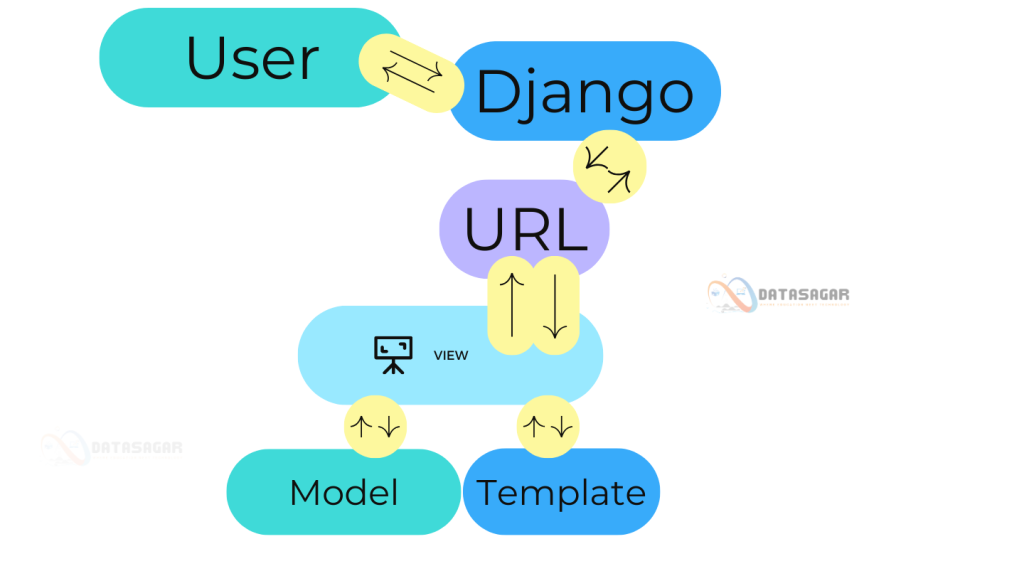
The MVT (Model-View-Template) architecture in Django is a software design pattern that separates concerns, making it easier to develop and maintain web applications. Here’s a clear breakdown of each component with a real-world example, incorporating a hypothetical project called “DataSagar,” which could be an analytics dashboard for data visualization.
1. Model (M):
- The Model is the data layer. It defines the structure of your database and manages data querying and manipulation.
- In DataSagar, let’s assume we have a feature to track user analytics. A model called
Analyticscan store user activity data.
from django.db import models
class Analytics(models.Model):
    user_id = models.IntegerField()
    page_visited = models.CharField(max_length=200)
    timestamp = models.DateTimeField(auto_now_add=True)

    def __str__(self):
        return f"User {self.user_id} visited {self.page_visited} at {self.timestamp}"
2. View (V):
- The View is the business logic layer. It processes user requests, interacts with the model, and passes data to the template.
- In DataSagar, let’s create a view to fetch and display analytics data for a specific user.
from django.shortcuts import render
from .models import Analytics

def user_analytics(request, user_id):
    # Fetch analytics data for the given user
    analytics_data = Analytics.objects.filter(user_id=user_id).order_by('-timestamp')
    return render(request, 'user_analytics.html', {'analytics_data': analytics_data, 'user_id': user_id})
3. Template (T):
- The Template is the presentation layer. It handles how data is displayed to the user.
- In DataSagar, we’ll create a template to display the analytics data in a table format.
<!-- user_analytics.html -->
<!DOCTYPE html>
<html>
<head>
    <title>User Analytics - DataSagar</title>
</head>
<body>
    <h1>Analytics for User {{ user_id }}</h1>
    <table border="1">
        <tr>
            <th>Page Visited</th>
            <th>Timestamp</th>
        </tr>
        {% for data in analytics_data %}
        <tr>
            <td>{{ data.page_visited }}</td>
            <td>{{ data.timestamp }}</td>
        </tr>
        {% endfor %}
    </table>
</body>
</html>
Real-World Example Flow:
Model: Analytics table in the database holds rows like:
| user_id | page_visited  | timestamp              |
|---------|---------------|------------------------|
| 1       | /dashboard    | 2021-01-2 12:30:00   |
| 1 | /reports | 2021-01-2 12:35:00 |View: When a user visits /analytics/1/, the user_analytics view fetches all records for user_id = 1 from the Analytics model.
Template: The user_analytics.html file formats the data into a user-friendly table.
URL Configuration:
To link the view with a URL:
# urls.py
from django.urls import path
from . import views

urlpatterns = [
    path('analytics/<int:user_id>/', views.user_analytics, name='user_analytics'),
]- Model defines the data structure (
Analyticstable). - View handles the business logic (fetching data for a user).
- Template displays the data in a readable format (HTML table).
This architecture allows you to focus on one layer at a time (data, logic, or presentation), making the project modular and easier to manage.